In my previous post about Learning Raspberry Pi Hardware, I wired up a few simple LEDS. Now it’s time to step it up a notch.
Even More LEDS
Actually, we’re just keeping it at the same notch for a moment. We need to use an “LED Bar Graph”, which is a compact set of ten LEDs.
Here it is all wired up.
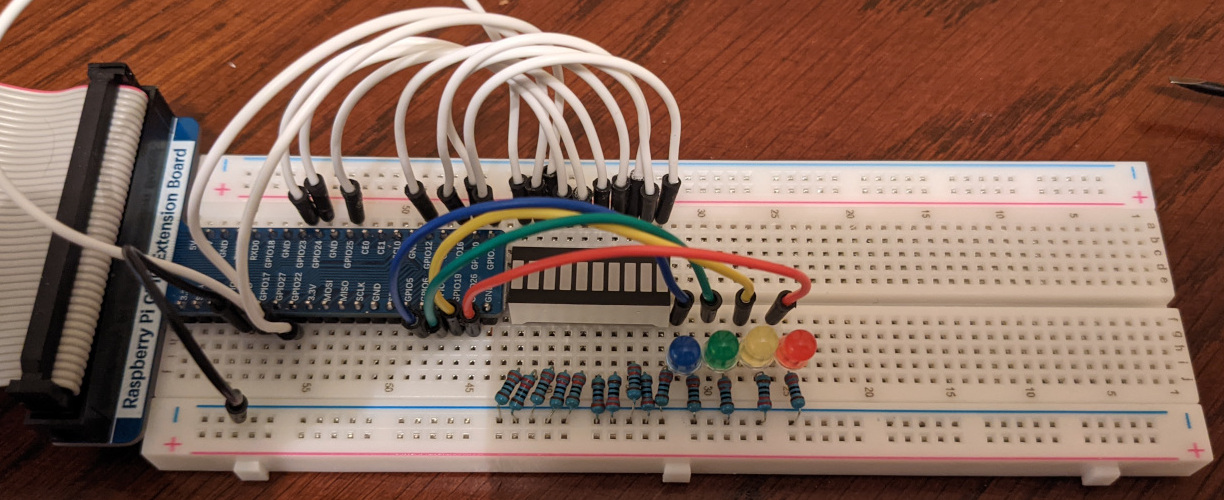
The white jumpers take power from various controllable GPIO pins to the upper half of the breadboard. The LED bar bridges from the top half of the board to the bottom half. Resistors bridge that side to ground, just like the single LEDS.
The code for this should look similar. I decided to randomize the LEDs on the bar instead of rotating them.
import random

import RPi.GPIO as GPIO

from util.gpio_state import GPIOState


class State(GPIOState):
    b_pin = 31
    g_pin = 33
    y_pin = 35
    r_pin = 37
    led_pins = [b_pin, g_pin, y_pin, r_pin]
    bar_pins = [11, 13, 15, 16, 18, 22, 32, 36, 38, 40]
    all_pins = led_pins + bar_pins

    rotate_state = 0
    randomize_state = 0

    def setup(self):
        GPIO.setup(self.all_pins, GPIO.OUT)
        GPIO.output(self.all_pins, GPIO.LOW)

    def rotate_bgyr(self):
        pin = self.rotate_state % len(self.led_pins)
        output = GPIO.HIGH if self.rotate_state % (len(self.led_pins) * 2) < len(self.led_pins) else GPIO.LOW
        GPIO.output(self.led_pins[pin], output)
        self.rotate_state = self.rotate_state + 1

    def randomize_bar(self):
        pin = self.randomize_state % len(self.bar_pins)
        output = GPIO.HIGH if random.choice([True, False]) else GPIO.LOW
        GPIO.output(self.bar_pins[pin], output)
        self.randomize_state = self.randomize_state + 1

    def loop(self):
        while not self.event.is_set():
            self.rotate_bgyr()
            self.randomize_bar()
            self.event.wait(0.5)


if __name__ == '__main__':
    with State() as state:
        state.loop()
Here’s what it looks like in action:
Button
Finally, we get to add some controls to the system.
The buttons in my kit have four pins. Two pins on either side of the button are connected internally. When the button is pressed, the pins on one side become connected to the pins on the other. GPIO can sense when a circuit is complete, so we can use that to trigger changes in the code.
Here it is wired up.
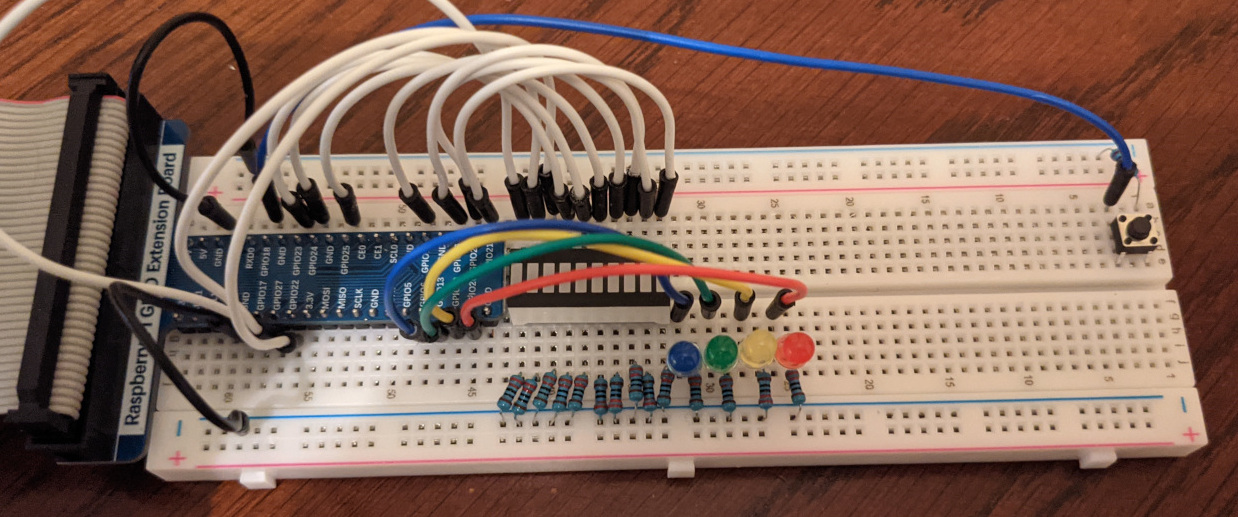
The long blue jumper connects a GPIO pin to one side of the button. The other side of the button is connected to ground via a resistor and a grounded jumper on the other side of the breadboard
I put the button on the far end of breadboard to make room for future additions.
Here’s the code to run it.
import random

import RPi.GPIO as GPIO

from util.gpio_state import GPIOState


class State(GPIOState):
    b_pin = 31
    g_pin = 33
    y_pin = 35
    r_pin = 37
    led_pins = [b_pin, g_pin, y_pin, r_pin]
    bar_pins = [16, 18, 22, 32, 36, 38, 40, 11, 13, 15]
    all_pins = led_pins + bar_pins

    button_pin = 12
    button_state = 0

    rotate_state = 0
    randomize_state = 0

    def setup(self):
        GPIO.setup(self.all_pins, GPIO.OUT)
        GPIO.output(self.all_pins, GPIO.LOW)
        GPIO.setup(self.button_pin, GPIO.IN, pull_up_down=GPIO.PUD_UP)
        GPIO.add_event_detect(self.button_pin, GPIO.FALLING, callback=self.button_event, bouncetime=300)

    def rotate_bgyr(self):
        pin = self.rotate_state % len(self.led_pins)
        output = GPIO.HIGH if self.rotate_state % (len(self.led_pins) * 2) < len(self.led_pins) else GPIO.LOW
        GPIO.output(self.led_pins[pin], output)
        self.rotate_state = self.rotate_state + 1

    def randomize_bar(self):
        pin = self.randomize_state % len(self.bar_pins)
        output = GPIO.HIGH if random.choice([True, False]) else GPIO.LOW
        GPIO.output(self.bar_pins[pin], output)
        self.randomize_state = self.randomize_state + 1

    def button_event(self, _channel):
        self.button_state = self.button_state + 1

    def loop(self):
        while not self.event.is_set():
            action = self.button_state % 3
            if action == 0:
                self.rotate_bgyr()
                self.randomize_bar()
            elif action == 1:
                self.rotate_bgyr()
            else:
                self.randomize_bar()
            self.event.wait(0.5)


if __name__ == '__main__':
    with State() as state:
        state.loop()
The GPIO.setup command is different for the button pin and I used GPIO.add_event_detect to invoke a function when the button is pressed.
The button switches the mode of operation between doing both an LED rotation and an LED bar randomization, to doing just a rotation, to doing just a randomization.
Here’s what that looks like:
Recap
So, I’ve learned about LED Bars and buttons.
Next time, I’ll learn about buzzers and potentiometers.